What Are the Signs of a Failing Battery Charger?

Time:2026-10-12 Author:Mason
0%

A failing battery charger rarely announces itself with one obvious symptom. What are the signs of a failing battery charger? The answer often begins with slow charging, unusual heat, interrupted power, or warning lights that behave differently. These clues may appear gradually, especially when a charger has worked reliably for several years. A charger can still show a green indicator while delivering little usable power. That makes diagnosis less straightforward.

Technicians commonly inspect the plug, cable, terminals, ventilation, and output behavior before blaming the charger. A hot casing deserves attention, particularly when the surrounding air is cool. Burning smells, buzzing sounds, cracked insulation, or a loose connector should never be ignored. These details matter. Still, not every charging problem comes from the charger itself. An aging battery, corroded terminal, damaged cable, or incompatible power source can create similar symptoms. That is where careless conclusions become risky.

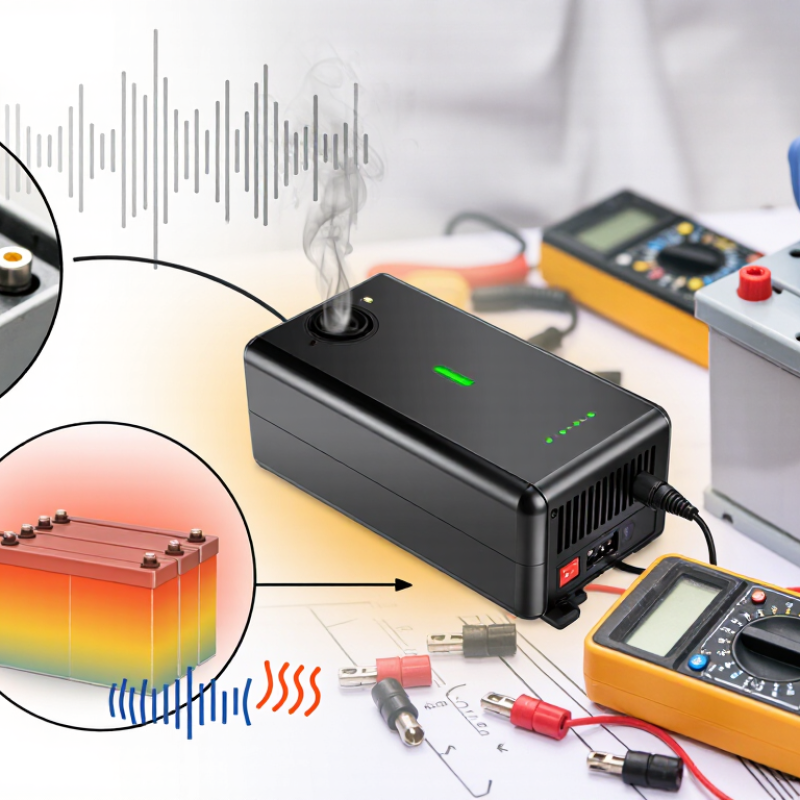
Reliable troubleshooting combines practical observation with the manufacturer’s specifications and, when appropriate, a multimeter test performed by a qualified professional. Record how long charging takes, whether the charger stops unexpectedly, and whether the battery becomes unusually warm. Small observations can reveal a pattern. Do not open a charger unless you have suitable training. Internal components may retain dangerous electrical energy after disconnection. This guide will examine common failure signs, explain why they occur, and distinguish charger faults from battery-related problems. Some uncertainty remains. Careful testing is more dependable than guessing, even when the charger appears to be the obvious cause.
What Are the Signs of a Failing Battery Charger?

Early Warning Signs of a Battery Charger Problem

What Are the Signs of a Failing Battery Charger?

A failing battery charger often gives small warnings before it stops working. The charging light may flicker, stay dark, or change color unexpectedly. Charging can also take much longer than usual. A battery that once charged in two hours may now need an entire night.

Unusual heat is another warning sign. The charger may feel hot near its plug, cable, or casing. A faint buzzing sound, burning smell, or loose connection deserves immediate attention. Do not ignore repeated power interruptions. They may indicate damaged internal components or a worn cable. I once assumed a slow charge came from an old battery, but the charger was the real problem. That mistake cost time and created unnecessary uncertainty.

Tips:

Check the charger with a compatible battery and a safe power outlet. Inspect the cable for cuts, bent pins, cracked insulation, or dark marks. Compare the charging time with the manufacturer’s normal range. Keep the charger on a hard, dry surface with open airflow. Stop using it if it becomes excessively hot, smells unusual, or shows visible damage. A basic voltage check can help, but only qualified technicians should open the charger. Sometimes, the evidence still seems unclear. Record the symptoms, temperature, and charging time before seeking professional testing.

Changes in Charging Speed, Power Output, and Battery Performance

What Are the Signs of a Failing Battery Charger?

A failing charger often reveals itself through changing charging speed. A battery that once charged in three hours may need six. Sometimes, charging stops and starts without warning. This pattern can indicate worn internal components, damaged cables, or unstable electrical connections. Check the charger’s output with a suitable meter, if you know how to use one. Do not rely only on the indicator light. Lights can remain normal while power delivery weakens.

Power output may also fluctuate under load. The charger may feel unusually hot, make a faint buzzing sound, or provide less current than its label states. Battery performance can expose the problem too. The battery may lose capacity quickly, drain faster after charging, or show inconsistent charge levels. However, an aging battery can create similar symptoms. That distinction matters. Compare the battery with a verified compatible charger before replacing anything. I have found this step easy to skip, and it can lead to the wrong diagnosis.

Tips: Record charging times for several cycles. Inspect plugs, ports, and cables for looseness or discoloration. Stop using the charger if it smells burnt, sparks, or becomes excessively hot. Keep testing simple. If output remains unstable, ask a qualified technician to inspect the charger and battery together.

Physical and Electrical Symptoms of Charger Failure

A failing battery charger often gives physical warnings before electrical testing confirms the problem. Look for cracked housing, melted plastic, darkened plug pins, or a cable that feels unusually soft. A sharp burnt smell deserves immediate attention. So does a charger that becomes painfully hot during normal use. Minor warmth is common, but heat that quickly spreads through the casing may indicate damaged components or poor internal connections. Listen closely. Buzzing, clicking, or intermittent rattling is not normal. In field inspections, these signs often appear alongside loose strain relief near the cable ends. One symptom can mislead, though. Dust can mimic damage, and a warm room can exaggerate heat.

Electrical symptoms can be subtler. The battery may charge very slowly, stop at the same percentage, or lose power soon after removal. An indicator light that flickers, stays dark, or changes unexpectedly may suggest unstable output. A multimeter can help verify voltage, but readings should match the charger’s specified output and be taken safely. Do not rely on a single measurement. A weak battery, damaged socket, or corroded connector can produce similar results. If voltage fluctuates sharply without movement, disconnect the charger and arrange a qualified inspection. I have seen users blame the charger too quickly; sometimes the battery itself is failing.

Tips: Keep the charger on a hard, ventilated surface. Check the cable before each use. Stop using it after smoke, sparks, exposed wires, or repeated overheating. Record charging time and temperature for several cycles.

Safe Tests to Confirm Whether the Charger Is Faulty

A failing battery charger often shows small clues before it stops working. The plug may feel unusually hot, the indicator may flicker, or charging may repeatedly start and stop. A sharp chemical smell, cracked casing, buzzing, or melted plastic requires immediate disconnection. Do not open the charger. Internal capacitors can retain dangerous energy after unplugging.

Use safe tests with the charger disconnected first. Check the cable, pins, and ventilation openings under bright light. Then connect the charger to a known-good battery only if the battery and charger are compatible. Measure the output with a digital multimeter, following the charger’s stated voltage range. A reading far below its specification suggests failure, but voltage alone can mislead. Some chargers show normal voltage without delivering usable current. A controlled load test by a qualified technician is more reliable. Never bridge terminals or test with exposed wires.

Heat also matters. During a normal session, place the charger on a hard, nonflammable surface and monitor it for fifteen minutes. Stop if the casing becomes too hot to touch comfortably. NFPA’s Electrical Fires report found electrical distribution and lighting equipment involved in about 24% of reported home fires, although this category is broader than battery chargers. IEC 60335-2-29 also emphasizes protection against abnormal operation. These figures do not prove a charger caused a fire, but they support careful testing. My own practical mistake was trusting a stable multimeter reading too quickly; a weak charger can pass that test and still fail under load.

When to Repair, Replace, or Stop Using the Charger

What Are the Signs of a Failing Battery Charger?

When to Repair, Replace, or Stop Using the Charger

A failing battery charger often gives small warnings before a serious fault. During inspections, I look for cracked insulation, bent connectors, loose ports, and darkened plastic. A charger that becomes unusually hot deserves attention. So does a sharp chemical smell, buzzing sound, or flickering indicator light. Slow charging may also signal damaged wiring or unstable internal components. Do not ignore repeated symptoms.

Stop using the charger immediately if it sparks, smokes, leaks, or causes the battery to swell. Unplug it without touching damaged areas, then move it away from heat and flammable materials. Never continue testing a charger with exposed wires. Safety comes first. A warm surface can be normal, but painful heat is not. This distinction is easy to misjudge.

Repair may make sense when the fault is limited to a replaceable cable, plug, or external connection. A qualified technician should inspect internal failures, especially when voltage readings fluctuate. Replace the charger when repair costs approach a reliable replacement, or when its casing shows heat damage. I once kept using a charger because it still worked intermittently. That was poor judgment. Intermittent charging usually means the problem is progressing, not disappearing. Record unusual heat, charging time, and battery behavior before seeking professional advice.

What Are the Signs of a Failing Battery Charger?

When to repair, replace, or stop using the charger

For a typical 12-volt lead-acid system, absorption charging is commonly around 14.2–14.7 V, while float charging is commonly around 13.5–13.8 V. Readings that remain far below the target, rise above approximately 15 V, or fluctuate significantly may indicate a faulty charger, damaged wiring, or an unsuitable charging mode. Stop using the charger if it becomes excessively hot, smells burnt, sparks, or shows damaged insulation. Always verify the exact limits in the charger and battery manufacturer’s instructions.

FAQS

What are common signs of a failing battery charger?

Charging may become slower or stop unexpectedly. The charger may feel unusually hot. Buzzing, clicking, cracked plastic, or dark plug pins are warning signs. Do not trust the indicator light alone.

Can a weak battery look like a faulty charger?

Yes. Both problems can cause short battery life and slow charging. Test with a verified compatible charger and battery. I have skipped this comparison before. It caused a wrong diagnosis.

How can I inspect a charger safely?

Disconnect it before checking the cable, plug, pins, and casing. Look under bright light. Watch for exposed wires, looseness, discoloration, or melted plastic. Never open the charger.

Can a multimeter confirm charger failure?

It can provide useful voltage information. The reading should match the charger’s stated output range. Voltage alone may mislead. A charger can show normal voltage but weak current delivery.

What is a safer way to test charger performance?

Use a known-good compatible battery. Monitor charging for about fifteen minutes. Keep the charger on a hard, nonflammable surface. A qualified technician can perform a controlled load test.

How hot is too hot for a charger?

Slight warmth can be normal. Rapidly increasing heat is not. Stop using the charger if the casing becomes painfully hot. Heat matters.

Should I continue using a charger that smells or sparks?

No. Disconnect it immediately, if safe to do so. Stop using chargers with smoke, sparks, burnt smells, or repeated overheating. Do not touch damaged wires. Arrange a qualified inspection.

How can I track charging problems over several cycles?

Record charging time, temperature, and the final charge level. Note sudden stops or repeated starts. Inspect the cable before each session. Patterns are more useful than one unusual reading.

Conclusion

What are the signs of a failing battery charger? Common early warnings include longer charging times, inconsistent power delivery, frequent interruptions, or a battery that no longer reaches its expected charge level. You may also notice reduced battery performance, unusual heat, buzzing sounds, a burning smell, damaged cables, loose connections, or visible discoloration around the plug and charger housing. These symptoms can indicate internal wear, electrical faults, or poor contact.

To confirm the problem safely, inspect the charger and cable for damage, try a compatible power outlet, and compare its performance with a properly functioning charger designed for the same battery. Avoid opening the charger or continuing to use it if it becomes excessively hot, sparks, smells burnt, or shows signs of melting. Minor issues such as a loose connection may be repairable by a qualified technician, but severe physical or electrical damage usually means replacement is safer. Stop using the charger immediately if it presents a risk of shock, fire, or battery damage.

Mason

Mason

Mason is a seasoned marketing professional with a deep expertise in the company's offerings and a passion for driving brand awareness. With a strong background in digital marketing strategies, he has an innate ability to connect with diverse audiences and effectively communicate product benefits.......